Smart Home Essentials for Families: What's Actually Worth It
Smart home products that actually help busy families. From smart speakers to cameras and kid-friendly routines, here's what's worth the investment.
Disclosure: This post contains affiliate links. If you purchase through my links, I may earn a small commission at no extra cost to you. I only recommend products I genuinely love and believe in. Thank you for supporting Eventful Eve! 🤍
I resisted the whole smart home thing for a long time. I didn't see the point. Why do I need to talk to my house when I can just flip a switch? Then my husband brought home an Echo Dot on a whim, and slowly — very slowly — I started to see how these little devices could actually help me manage the daily chaos of a family with young kids. Now I'm the one adding things to the smart home setup, and I'll be the first to admit that some of these products have genuinely made our days smoother. Not all of them, though. I've also bought my share of smart gadgets that collected dust. So here's my honest breakdown of what's worth it and what you can skip.
Smart Speakers: The Hub of Everything
A smart speaker is the gateway, and honestly, it's where most families should start. We use Amazon Echo devices, but Google Nest works just as well — pick whichever ecosystem you prefer and stick with it.
What we actually use ours for:
- Timers. So many timers. Homework timer, oven timer, "you have five minutes until we leave" timer. I run multiple timers simultaneously and just ask which ones are active. This alone is worth the price.
- Morning routines. I set up an Alexa Routine that plays a gentle alarm, tells the kids the weather, and starts a playlist at 7 AM. It's become our rhythm and it saves me from being the nagging alarm clock.
- Music and audiobooks. We play music during school, during chores, during dinner. The kids request songs while they clean their rooms. We listen to audiobooks during lunch.
- Quick answers. "How do you spell chrysanthemum?" "What's the capital of Peru?" "How many cups in a gallon?" Having a voice-activated encyclopedia in the kitchen during homeschool hours is genuinely useful.
- Intercom. If you have multiple Echo devices, you can use them as an intercom between rooms. I use Drop In to call the kids down for dinner instead of screaming up the stairs. Game changer.
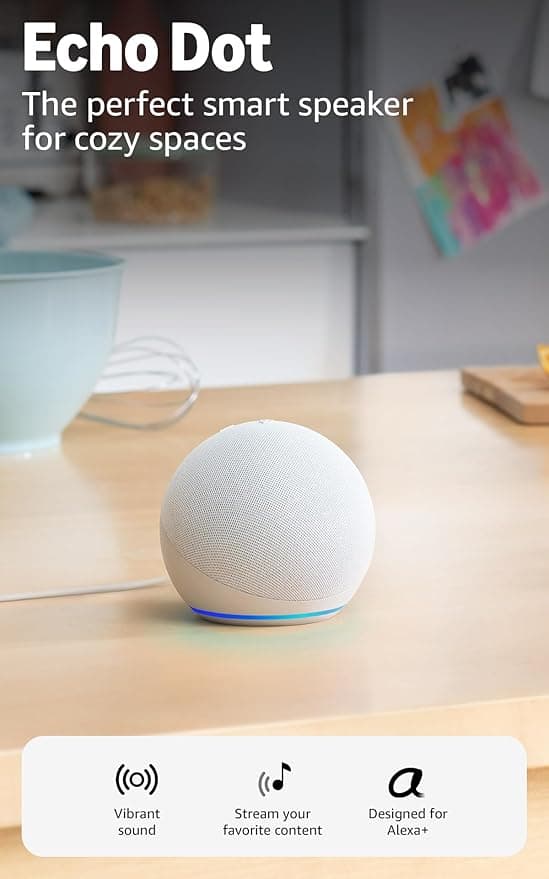
Echo Dot (5th Gen) Smart Speaker
The perfect starting point for any family smart home. Great sound for its size, works as an intercom between rooms, sets timers, plays music, and answers homework questions all day long.
Smart Cameras and Video Doorbells
I was hesitant about cameras inside the house, but a video doorbell and one outdoor camera have been more useful than I expected.
Video doorbell — we use a Ring doorbell and it's mostly about peace of mind. I can see who's at the door without opening it, check on package deliveries from my phone, and see when the kids come back from playing outside. During the holidays, I get a notification when packages arrive so I can grab them before little eyes spot them.
Outdoor camera — we have one pointed at the backyard and one at the driveway. When the kids are playing outside and I'm inside making lunch, I can pull up the camera on my phone or ask the Echo Show to display it. Is it a replacement for actual supervision? Absolutely not. But as an extra set of eyes while I'm in the next room? Really helpful.
Baby monitors. If you have little ones, a smart baby monitor that connects to your phone and sends alerts is a massive upgrade over the old audio-only monitors. We used ours for years, well past the baby stage, because it was nice to check on the toddler during nap time without opening the door.
Smart Thermostats
This is one that pays for itself. We installed a Nest thermostat three years ago and our energy bill went down noticeably in the first month. The scheduled temperature changes mean the house isn't blasting heat when we're out for the afternoon, and it warms up before we get home.
The family-relevant features:
- Schedule different temperatures for different times of day
- Adjust from your phone when you're away
- Set it to eco mode automatically when nobody's home
- Some models learn your habits and adjust on their own
The kids' rooms tend to run warmer than the rest of the house, so being able to see the temperature readings from the app and adjust without going upstairs is nice.
Smart Lighting
Okay, smart bulbs are where I draw the line between "useful" and "unnecessary" — and it depends entirely on how you use them.
Worth it: Smart bulbs or plugs for kids' rooms. We set up a bedtime routine where the lights dim to warm orange at 7:30 PM and turn off at 8:00 PM. The kids know that when the lights start dimming, it's time to wind down. It's become a visual cue that works better than me saying "bedtime" twelve times.
Also worth it: Smart plugs for lamps and seasonal lights. I plug the Christmas tree into a smart plug so it turns on at 5 PM and off at 10 PM every day. Same with the porch light — on at sunset, off at 11 PM.
Probably not worth it: Replacing every bulb in your house with smart bulbs. It gets expensive fast and honestly, most rooms don't need that level of automation.
Routines and Automations for Kids
This is where the smart home stuff goes from "neat gadget" to "actual parenting tool." Setting up routines that run automatically creates structure without you having to enforce it manually every single time.
Our morning routine (runs at 7:00 AM weekdays):
- Bedroom lights gradually brighten over 10 minutes
- Smart speaker plays a gentle wake-up playlist
- Alexa announces the weather and day's schedule
Our bedtime routine (runs at 7:30 PM):
- Lights in kids' rooms shift to warm, dim setting
- Smart speaker plays an audiobook or calming music
- At 8:00 PM, lights turn off and music stops
Homework time (I trigger this one manually):
- Living room lights go to full brightness
- TV turns off via smart plug
- Alexa sets a 45-minute focus timer
These routines took maybe 20 minutes to set up and they run every day without me thinking about them. That's 20 minutes of setup for months of smoother transitions.
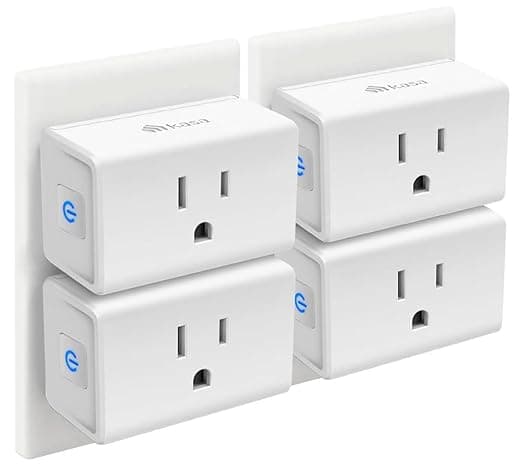
Kasa Smart Plug Mini 15A 4-Pack
The easiest entry point into a smart home. Plug in a lamp, the TV, the Christmas tree — anything you want to control by voice or schedule. Works with Alexa and Google Home. Four-pack covers the essentials.
What I'd Skip
Not everything smart is worth the smart premium. Here's what I've tried and returned or stopped using:
- Smart fridge — cool concept, not worth the price tag for what it does
- Smart lock for interior doors — the kids figured out how to bypass it in about four minutes
- Robot vacuum without mapping — the cheap ones bump around randomly and miss half the room. If you're going to get one, get a good one with room mapping
- Smart water bottle — yes, this exists. No, you don't need your water bottle to send you notifications
Where to Start
If you're brand new to all of this, here's the order I'd recommend:
- One smart speaker for the kitchen or main living area ($25-50)
- A few smart plugs for lamps and the TV ($6-8 each)
- A video doorbell when you're ready for the next step ($100-200)
- A smart thermostat when your budget allows ($130-250)
Start small, see what actually fits your family's life, and build from there. The goal isn't to have the fanciest house on the block — it's to take a few daily annoyances off your plate so you can focus on what matters.